
Mino Casino App.
Your casino.
On your smartphone.
Slots, Live Casino and Mino’s Labyrinth are available on the go too. Play directly in your browser or open Mino from the icon on your Home Screen.
For Android and iPhone. With your existing Mino account. Adults aged 18 and over only.

Mino on your Home Screen.
Our app runs through your mobile browser. Select «Play on mobile» to open Mino on your smartphone and add the casino to your Home Screen. You do not need a download from the App Store or Google Play, and you do not need an APK file.
On Android, use Chrome; on iPhone, use Safari. If you do not want to add anything, you can simply keep playing in your browser.
Android. Open Mino with one tap.
Open the casino in Chrome
Open Mino Casino in Chrome on your Android smartphone and tap the three dots in the top-right corner.

Add to Home Screen
From the menu, select «Add to Home screen».
Confirm installation
Confirm by selecting «Install». You can then open Mino from the new icon on your Home Screen and log in.
iPhone. Your Mino in Safari.
Open the casino in Safari
Open Mino Casino in Safari and tap the Share icon in the browser bar.
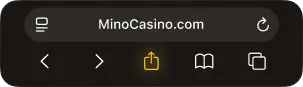
Add to Home Screen
From the Share menu, select «Add to Home Screen».
Confirm the shortcut
Confirm by selecting «Add». Next time, open the casino from the Mino icon on your Home Screen.
You can also add Mino to your Home Screen from Chrome on iPhone: use the Share icon and select «Add to Home Screen». The position of browser controls may differ depending on the version.
One account. On every device.
On your smartphone, log in with the same email address or username and password you use on your computer. Your balance and account settings stay the same when you switch devices. You do not need a second account.
No Mino account yet? You can also register on your smartphone.
Your Mino. On mobile too.
Slots and Live Casino
Find our slots using search, categories and providers. In the Live Casino, you can play at dealer tables or join game shows. You need a stable internet connection for games in progress.
Bonuses and free spins

You can also choose your deposit bonus from the cashier on mobile. After making the qualifying deposit, activate it under «My Bonuses». Wagering requirements, time limits and bet limits apply on every device.
Cashier and account
Use the cashier in your account for deposits and withdrawal requests. The payment methods available to you depend on your country and the payment provider.
Mino’s Labyrinth

You can also complete tasks in the Labyrinth and claim your rewards on your smartphone. The Battle Pass brings new challenges every month.
Having trouble with the app?
The menu option is missing
In Chrome, you’ll find the option in the three-dot menu; in Safari, it is in the Share menu. If it is missing, updating your browser may help. You can always use Mino directly in your browser.
A game does not load
A weak connection can interrupt loading or a live round. Reconnecting and reopening the game will often help. If the problem keeps happening, tell our support team which game you were playing, along with your device and browser.
You cannot log in
Your login details are the same as on your computer. If you have forgotten your password, reset it via «Forgot password?» in the casino. Further help is available from minocasino Live Chat.
Questions about the Mino Casino App.
Do I need to download a Mino Casino APK?
No. Our browser app does not require an APK file. On Android, open Mino in Chrome and add the casino to your Home Screen from the browser menu.
Do I need the App Store or Google Play?
No. Our browser app does not require a download from the App Store or Google Play. Add Mino directly to your Home Screen in Safari or Chrome.
Can I use Mino without installing anything?
Yes. Our casino runs directly in your mobile browser. Use your existing account to log in on Android, iPhone and tablet.
Can I play offline?
No. Even after you add it to your Home Screen, our app still needs an internet connection — for logging in as well as for slots and live games.
Do my bonuses also apply on mobile?
Yes. You use the same account. An active bonus keeps the same wagering requirements, time limits and bet limits when you switch between your computer and smartphone.
Is the Mino Casino App a voucher app?
No. Our app is for slots, Live Casino and your Mino account. Mino Casino is not connected to the voucher app with the same name.